
一、模式概述
意图
在一个操作中定义算法的骨架,而将某些步骤延迟到子类中。模板方法使得子类可以在不改变算法结构的情况下重新定义算法的某些特定步骤。
1.1 核心角色
AbstractClass(抽象类)
实现模板方法Template(),按固定顺序调用一系列PrimitiveOperation()和 Hook 方法。ConcreteClass(具体子类)
实现抽象类中的基本方法(PrimitiveOperation)和可选钩子(Hook),完成具体逻辑。Template Method(模板方法)
在 AbstractClass 中定义,不能被子类覆写,决定了算法的执行流程。
1.2 UML 类图
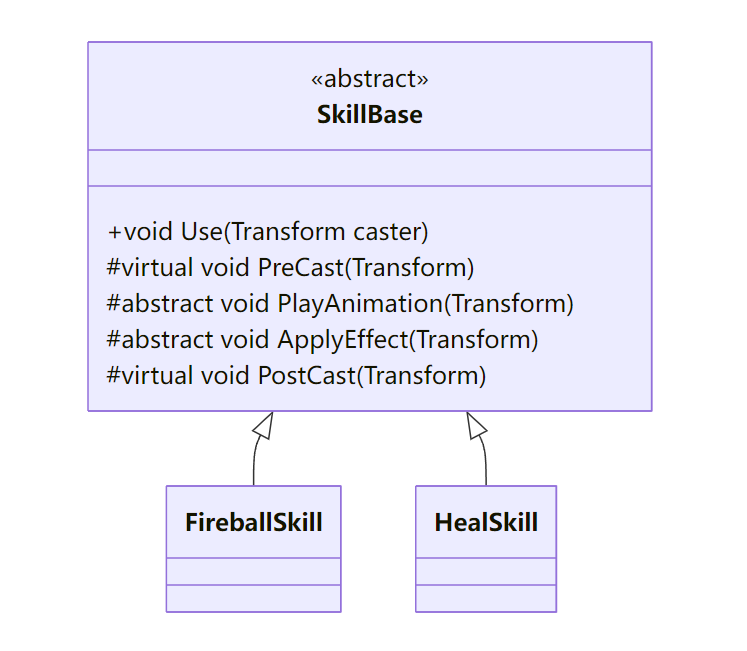
Use()为模板方法(Template Method),规定了技能释放的流程:
public void Use(Transform caster) {
    PreCast(caster);
    PlayAnimation(caster);
    ApplyEffect(caster);
    PostCast(caster);
}
PreCast、PostCast为 Hook 方法,提供默认(空)实现;子类可按需覆写。PlayAnimation、ApplyEffect为 Primitive Operation,子类必须实现。
二、Unity 实战示例:技能释放模板
2.1 抽象基类:SkillBase
using UnityEngine;

public abstract class SkillBase : ScriptableObject {
    [Header("公共播报参数")]
    public AnimationClip animationClip;
    public float          cooldown = 1f;

    private bool _onCooldown;

    /// <summary>模板方法,定义技能释放骨架</summary>
    public void Use(Transform caster) {
        if (_onCooldown) return;
        PreCast(caster);
        PlayAnimation(caster);
        ApplyEffect(caster);
        PostCast(caster);
        caster.GetComponent<MonoBehaviour>()
              .StartCoroutine(CooldownRoutine());
    }

    /// <summary>可选钩子:播放前准备</summary>
    protected virtual void PreCast(Transform caster) { /* 默认空 */ }

    /// <summary>基本操作:播放动画</summary>
    protected abstract void PlayAnimation(Transform caster);

    /// <summary>基本操作:应用效果</summary>
    protected abstract void ApplyEffect(Transform caster);

    /// <summary>可选钩子:播放后善后</summary>
    protected virtual void PostCast(Transform caster) { /* 默认空 */ }

    private IEnumerator CooldownRoutine() {
        _onCooldown = true;
        yield return new WaitForSeconds(cooldown);
        _onCooldown = false;
    }
}
2.2 具体技能:FireballSkill 与 HealSkill
[CreateAssetMenu("Skills/Fireball")]
public class FireballSkill : SkillBase {
    public GameObject projectilePrefab;
    public float      speed = 15f;
    public float      damage = 20f;

    protected override void PlayAnimation(Transform caster) {
        var anim = caster.GetComponent<Animator>();
        anim.Play(animationClip.name);
    }

    protected override void ApplyEffect(Transform caster) {
        var go = Instantiate(projectilePrefab, caster.position, caster.rotation);
        var rb = go.GetComponent<Rigidbody>();
        rb.velocity = caster.forward * speed;
        Destroy(go, 5f);
    }

    protected override void PostCast(Transform caster) {
        // 可添加特效、音效
        AudioManager.Instance.PlaySFX("FireballCast");
    }
}

[CreateAssetMenu("Skills/Heal")]
public class HealSkill : SkillBase {
    public float healAmount = 30f;

    protected override void PlayAnimation(Transform caster) {
        var anim = caster.GetComponent<Animator>();
        anim.Play(animationClip.name);
    }

    protected override void ApplyEffect(Transform caster) {
        var health = caster.GetComponent<Health>();
        if (health != null) health.Heal(healAmount);
    }
}
2.3 客户端调用
public class PlayerSkills : MonoBehaviour {
    [SerializeField] private SkillBase[] skills;
    void Update() {
        if (Input.GetKeyDown(KeyCode.Alpha1)) skills[0].Use(transform);
        if (Input.GetKeyDown(KeyCode.Alpha2)) skills[1].Use(transform);
    }
}
- 客户端无需关心各技能的内部实现,只需按顺序调用
Use()。 - 新增技能时,只需继承
SkillBase并实现两段逻辑,无需改动调用代码。
三、高级扩展
3.1 可插拔 Hook
SkillBase在PreCast和PostCast中提供默认实现,子类可选择覆写。可在基类中引入更多 Hook:
protected virtual bool CanCast(Transform caster) => true;
public void Use(Transform caster) {
    if (!CanCast(caster) || _onCooldown) return;
    // …剩余流程…
}
3.2 模板方法与策略结合
- 在基类持有策略接口,如
IEffectStrategy,用以复用效果逻辑:
[SerializeField] private IEffectStrategy effect;
protected override void ApplyEffect(Transform caster) {
    effect.Execute(caster);
}
3.3 数据驱动的模板
- 将所有
SkillBase及其参数配置为 ScriptableObject,策划无需写代码即可组合新技能。
四、性能与调试
GC 控制
- 避免在
Use()中频繁分配临时对象;
- 避免在
Profiler
- 确认
PlayAnimation与ApplyEffect的耗时,必要时异步加载资源;
- 确认
日志可视化
- 在模板方法中打印当前步骤及子类类型,便于调试:
Debug.Log($"[Skill] {GetType().Name}.Use() → PreCast");
五、常见陷阱与防坑指南
| 场景 | 陷阱 | 建议 |
|---|---|---|
| 子类忘记调用基类 Hook | 子类覆写 PreCast 或 PostCast 忘记调用 base... 导致流程缺失 |
在基类中将 Hook 设计为 sealed 或在文档中明确要求 |
| 模板方法逻辑过长 | 将过多无关步骤都写进模板方法,导致基类臃肿 | 只在基类放置真正公共的流程骨架,个性化逻辑交给子类或策略 |
| 子类间耦合 | 子类 A 的一段逻辑强依赖子类 B 的实现 | 保持子类独立,必要时将公共逻辑提炼到独立组件或 service |
| 流程分支过多 | 在模板方法中增加过多 if/else 分支以兼容不同子类 |
将分支逻辑下沉到子类,或使用策略/责任链替代流程内分支 |
| 运行时热更新 | 修改子类或 SO 时,未重新加载模板基类流程,导致行为不一致 | 在 SO 资产上监听 OnValidate 或通过热重载机制手动刷新流程 |
六、小结与最佳实践
- 算法骨架:在基类中用
Use()明确流程步骤,不可被子类覆盖; - 可变步骤留给子类:
abstract和virtual方法合理区分,保证扩展点清晰; - Hook 方法:提供默认空实现,让子类可选覆写;
- 组合其他模式:与策略、装饰器等模式结合,增强灵活性;
- 配置化实现:将所有技能、流程定义为 ScriptableObject,走资源驱动路线。